Contents
Overview
The Status Page displays the current status of all Streets Heaver's web-based services. You can access it at status.streets-heaver.com.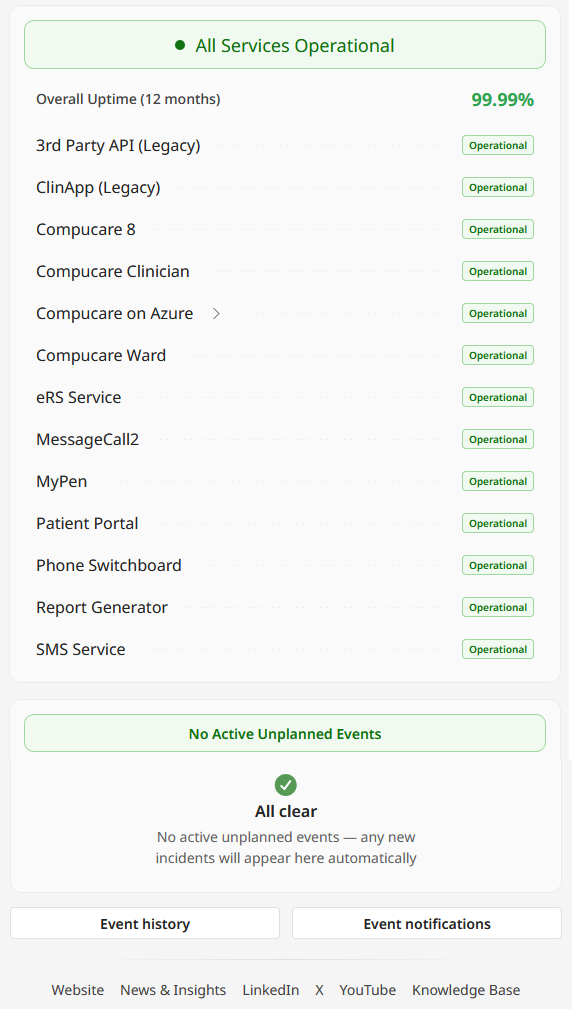
Services that are working as intended with no issues have a status of Operational.
If there were an incident affecting a service, it would be displayed as either a Performance Issue, a Partial Outage or a Major Outage.
If there are any active events, such as planned maintenance, they are shown in the Unplanned Events section of the screen. You can click Event history to view past events.
Subscribing to Event Notifications
You can opt in to email alerts when an event occurs.
1. Click Event notifications to open the form shown below.
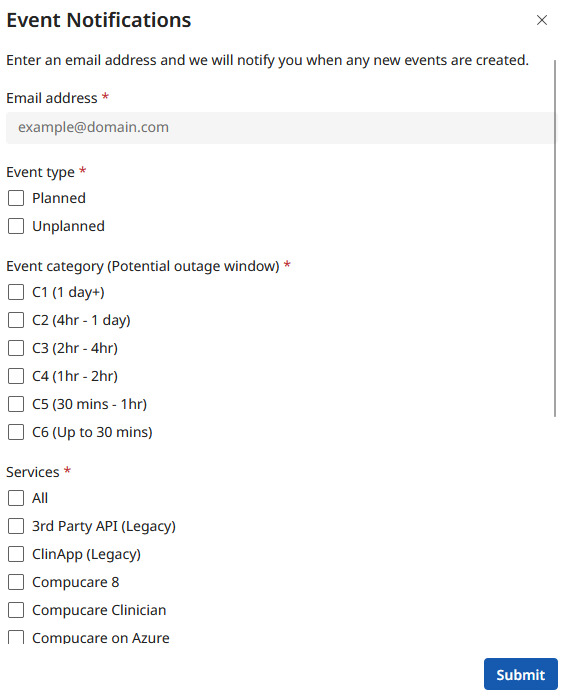
2. Enter your email address.
3. Select which events you'd like to be alerted about by clicking the relevant tickboxes. You can choose to receive alerts based on whether the event is planned or unplanned, how long the event is likely to last, and the service(s) affected.
4. Click Submit.
Was this article helpful?
That’s Great!
Thank you for your feedback
Sorry! We couldn't be helpful
Thank you for your feedback
Feedback sent
We appreciate your effort and will try to fix the article